Appendix#
1D Symbologies#
Symbology |
AIM |
Newtologic |
||
|---|---|---|---|---|
ID |
Possible Modifiers |
ID |
Hex |
|
All Symbologies |
99 |
|||
Codabar |
]Fm |
0-1 |
a |
61 |
Code 11 |
]H3 |
h |
68 |
|
Code 128 |
]Cm |
0, 1, 2, 4 |
j |
6A |
Code 32 Pharmaceutical (PARAF) |
]X0 |
< |
3C |
|
Code 39 (supports Full ASCII mode) |
]Am |
0, 1, 3, 4, |
b |
62 |
TCIF Linked Code 39 (TLC39) |
]L2 |
T |
54 |
|
Code 93 and 93i |
]Gm |
0-9, A-Z, a-m |
i |
69 |
EAN |
]Em |
0, 1, 3, 4 |
d |
64 |
EAN-13 (including Bookland EAN) |
]E0 |
d |
64 |
|
EAN-13 with Add-On |
]E3 |
d |
64 |
|
EAN-13 with Extended Coupon Code |
]E3 |
d |
64 |
|
EAN-8 |
]E4 |
D |
44 |
|
EAN-8 with Add-On |
]E3 |
D |
44 |
|
GS1 |
||||
GS1 DataBar |
]em |
0 |
y |
79 |
GS1 DataBar Limited |
]em |
{ |
7B |
|
GS1 DataBar Expanded |
]em |
} |
7D |
|
GS1-128 |
]C1 |
I |
49 |
|
2 of 5 |
||||
China Post (Hong Kong 2 of 5) |
]X0 |
Q |
51 |
|
Interleaved 2 of 5 |
]Im |
0, 1, 3 |
e |
65 |
Matrix 2 of 5 |
]X0 |
m |
6D |
|
NEC 2 of 5 |
]X0 |
Y |
59 |
|
Straight 2 of 5 IATA |
]Rm |
0, 1, 3 |
f |
66 |
Straight 2 of 5 Industrial |
]S0 |
f |
66 |
|
MSI |
]Mm |
0, 1 |
g |
67 |
Telepen |
]Bm |
t |
74 |
|
UPC |
0, 1, 2, 3, 8, |
|||
UPC-A |
]E0 |
c |
63 |
|
UPC-A with Add-On |
]E3 |
c |
63 |
|
UPC-A with Extended Coupon Code |
]E3 |
c |
63 |
|
UPC-E |
]E0 |
E |
45 |
|
UPC-E with Add-On |
]E3 |
E |
45 |
|
UPC-E1 |
]X0 |
E |
45 |
|
Add Newtologic Code ID |
5C |
|||
Add AIM Code ID |
5C |
|||
Add Backslash |
5C |
|||
Batch Mode Quantity |
5 |
35 |
2D Symbologies#
Symbology |
AIM |
Newtologic |
||
|---|---|---|---|---|
ID |
Possible Modifiers |
ID |
Hex |
|
All Symbologies |
99 |
|||
Aztec Code |
]zm |
0-9, A-C |
z |
7A |
Chinese Sensible Code (Han Xin Code) |
]X0 |
H |
48 |
|
Codablock A |
]O6 |
0, 1, 4, 5, 6 |
V |
56 |
Codablock F |
]Om |
0, 1, 4, 5, 6 |
q |
71 |
Code 49 |
]Tm |
0, 1, 2, 4 |
l |
6C |
Data Matrix |
]dm |
0-6 |
w |
77 |
GS1 |
]em |
0-3 |
y |
79 |
GS1 Composite |
]em |
0-3 |
y |
79 |
GS1 |
]em |
0-3 |
y |
79 |
MaxiCode |
]Um |
0-3 |
x |
78 |
PDF417 |
]Lm |
0-2 |
r |
72 |
MicroPDF417 |
]Lm |
0-5 |
R |
52 |
QR Code |
]Qm |
0-6 |
s |
73 |
Micro QR |
]Qm |
s |
73 |
Postal Code#
Symbology |
AIM |
Newtologic |
||
|---|---|---|---|---|
ID |
Possible Modifiers |
ID |
Hex |
|
All Symbologies |
99 |
|||
Australian Post |
]X0 |
A |
41 |
|
British Post |
]X0 |
B |
42 |
|
Canadian Post |
]X0 |
C |
43 |
|
China Post |
]X0 |
Q |
51 |
|
InfoMail |
]X0 |
, |
2c |
|
Intelligent Mail Bar Code |
]X0 |
M |
4D |
|
Japanese Post |
]X0 |
J |
4A |
|
KIX (Netherlands) Post |
]X0 |
K |
4B |
|
Korea Post |
]X0 |
? |
3F |
|
Planet Code |
]X0 |
L |
4C |
|
Postal-4i |
]X0 |
N |
4E |
|
Postnet |
]X0 |
P |
50 |
ASCII Conversion Table#
Hexadecimal |
decimal |
character |
|---|---|---|
00 |
0 |
NUL (Null char.) |
01 |
1 |
SOH (Start of Header) |
02 |
2 |
STX (Start of Text) |
03 |
3 |
ETX (End of Text) |
04 |
4 |
EOT (End of Transmission) |
05 |
5 |
ENQ (Inquiry) |
06 |
6 |
ACK (Acknowledgment) |
07 |
7 |
BEL (Bell) |
08 |
8 |
BS (Backspace) |
09 |
9 |
HT (Horizontal Tab) |
0a |
10 |
LF (Line Feed) |
0b |
11 |
VT (Vertical Tab) |
0c |
12 |
FF (Form Feed) |
0d |
13 |
CR (Carriage Return) |
0e |
14 |
SO (Shift Out) |
0f |
15 |
SI (Shift In) |
10 |
16 |
DLE (Data Link Escape) |
11 |
17 |
DC1 (XON) (Device Control 1) |
12 |
18 |
DC2 (Device Control 2) |
13 |
19 |
DC3 (XOFF) (Device Control 3) |
14 |
20 |
DC4 (Device Control 4) |
15 |
21 |
NAK (Negative Acknowledgment) |
16 |
22 |
SYN (Synchronous Idle) |
17 |
23 |
ETB (End of Trans. Block) |
18 |
24 |
CAN(Cancel) |
19 |
25 |
EM (End of Medium) |
1a |
26 |
SUB (Substitute) |
1b |
27 |
ESC (Escape) |
1c |
28 |
FS (File Separator) |
1d |
29 |
GS (Group Separator) |
1e |
30 |
RS (Request to Send) |
1f |
31 |
US (Unit Separator) |
20 |
32 |
SP(Space) |
21 |
33 |
! (Exclamation Mark) |
22 |
34 |
“ (Double Quote) |
23 |
35 |
# (Number Sign) |
24 |
36 |
$ (Dollar Sign) |
25 |
37 |
% (Percent) |
26 |
38 |
& (Ampersand) |
27 |
39 |
` (Single Quote) |
28 |
40 |
((Right / Closing Parenthesis) |
29 |
41 |
) (Right / Closing Parenthesis) |
2a |
42 |
*(Asterisk) |
2b |
43 |
+ (Plus) |
2c |
44 |
, (Comma) |
2d |
45 |
- (Minus / Dash) |
2e |
46 |
. (Dot) |
2f |
47 |
/ (Forward Slash) |
30 |
48 |
0 |
31 |
49 |
1 |
32 |
50 |
2 |
33 |
51 |
3 |
34 |
52 |
4 |
35 |
53 |
5 |
36 |
54 |
6 |
37 |
55 |
7 |
38 |
56 |
8 |
39 |
57 |
9 |
3a |
58 |
:(Colon) |
3b |
59 |
;(Semi-colon) |
3c |
60 |
< (Less Than) |
3d |
61 |
= (Equal Sign) |
3e |
62 |
> (Greater Than) |
3f |
63 |
?(Question Mark) |
40 |
64 |
@(AT Symbol) |
41 |
65 |
A |
42 |
66 |
B |
43 |
67 |
C |
44 |
68 |
D |
45 |
69 |
E |
46 |
70 |
F |
47 |
71 |
G |
48 |
72 |
H |
49 |
73 |
I |
4a |
74 |
J |
4b |
75 |
K |
4c |
76 |
L |
4d |
77 |
M |
4e |
78 |
N |
4f |
79 |
O |
50 |
80 |
P |
51 |
81 |
Q |
52 |
82 |
R |
53 |
83 |
S |
54 |
84 |
T |
55 |
85 |
U |
56 |
86 |
V |
57 |
87 |
W |
58 |
88 |
X |
59 |
89 |
Y |
5a |
90 |
Z |
5b |
91 |
[(Left/Opening Bracket) |
5c |
92 |
\ (Back Slash) |
5d |
93 |
] (Right / Closing Bracket) |
5e |
94 |
^ (Caret/Circumflex) |
5f |
95 |
_ (Underscore) |
60 |
96 |
‘ (Grave Accent) |
61 |
97 |
a |
62 |
98 |
b |
63 |
99 |
c |
64 |
100 |
d |
65 |
101 |
e |
66 |
102 |
f |
67 |
103 |
g |
68 |
104 |
h |
69 |
105 |
i |
6a |
106 |
j |
6b |
107 |
k |
6c |
108 |
l |
6d |
109 |
m |
6e |
110 |
n |
6f |
111 |
o |
70 |
112 |
p |
71 |
113 |
q |
72 |
114 |
r |
73 |
115 |
s |
74 |
116 |
t |
75 |
117 |
u |
76 |
118 |
v |
77 |
119 |
w |
78 |
120 |
x |
79 |
121 |
y |
7a |
122 |
z |
7b |
123 |
{ (Left/Opening Brace) |
7c |
124 |
| (Vertical Bar) |
7d |
125 |
} (Right/Closing Brace) |
7e |
126 |
~ (Tilde) |
7f |
127 |
DEL(Delete) |
Barcode example#
Example content: 1234567890#

Example content: 0012345678905#

Example content: A13579B#

Example content: BC321#
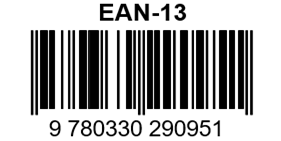
Example content: 9780330290951#

Example content: Code 128#

Example content: 123456-9$#
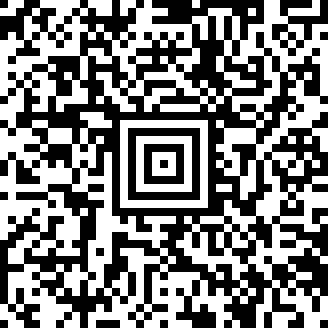
Example content: Package #98765-43210<CR><LF>Ship To:<CR><LF>Jane Doe<CR><LF>123 Main Street<CR><LF>Anywhere, NY 12345<SUB>#

Example content: 01234567#
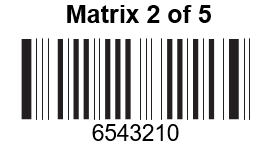
Barcode example picture#
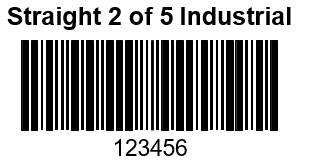
Barcode example picture#

Example content: (01)00123456789012#
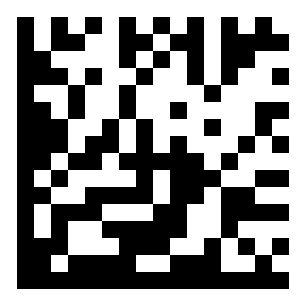
Example content: Test Symbol#
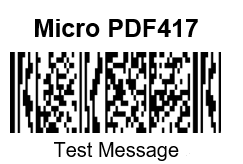
Barcode example picture#
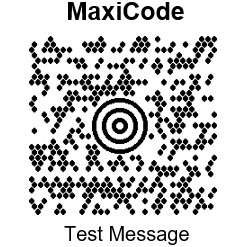
Barcode example picture#

Example content: 1998 Chev Blazer<CR>123437486089J672<CR>Reg PAN 123 ABC Dec 1999#
Appendix Charts#

0#

1#

2#

3#

4#

5#

6#

7#

8#

9#

A#

B#

C#

D#

E#

F#

Save#

give up#
Note
If an error occurs while scanning letters or numbers (before scanning the Save barcode), scan the Abandon barcode, rescan the correct letters or numbers, and then scan the Save barcode.
Keyboard operation ASCII conversion#
Hexadecimal |
decimal |
CTRL+X |
Description |
|
|---|---|---|---|---|
00 |
0 |
CTRL+@ |
||
01 |
1 |
CTRL+A |
Select all |
|
02 |
2 |
CTRL+B |
Bold |
|
03 |
3 |
CTRL+C |
copy |
|
04 |
4 |
CTRL+D |
Font format |
|
05 |
5 |
CTRL+E |
center alignment |
|
06 |
6 |
CTRL+F |
Find |
|
07 |
7 |
CTRL+G |
position |
|
08 |
8 |
CTRL+H |
replace |
|
09 |
9 |
CTRL+I |
italics |
|
0a |
10 |
CTRL+J |
Justify |
|
0b |
11 |
CTRL+K |
hyperlink |
|
0c |
12 |
CTRL+L |
left aligned |
|
0d |
13 |
CTRL+M |
left indent |
|
0e |
14 |
CTRL+N |
New |
|
0f |
15 |
CTRL+O |
Enable |
|
10 |
16 |
CTRL+P |
||
11 |
17 |
CTRL+Q |
||
12 |
18 |
CTRL+R |
Align right |
|
13 |
19 |
CTRL+S |
Save |
|
14 |
20 |
CTRL+T |
First line indent |
|
15 |
21 |
CTRL+U |
Underline |
F12 |
16 |
22 |
CTRL+V |
Paste |
F1 |
17 |
23 |
CTRL+W |
Write disk closed |
F2 |
18 |
24 |
CTRL+X |
cut |
F3 |
19 |
25 |
CTRL+Y |
repeat |
F4 |
1a |
26 |
CTRL+Z |
Cancel |
F5 |
1b |
27 |
CTRL+[ |
F6 |
|
1c |
28 |
CTRL+\ |
F7 |
|
1d |
29 |
CTRL+] |
F8 |
|
1e |
30 |
CTRL+^ |
F9 |
|
1f |
31 |
CTRL+- |
F10 |
|
7f |
32 |
CTRL+ |