Trigger Settings#
Trigger Mode#
Trigger mode selection/Trigger Mode#
Used to select the trigger method for the device to start decoding. The following options are currently confirmed from the original text:
LevelEnters the decoding process after the trigger event starts, until the trigger ends, decoding is successful, or the “decoding session timeout” is reached.Presentation Modeis automatically triggered when the device detects a target within the field of view and attempts to decode it. This mode is only available in decoding mode, and the target detection range is fixed under normal lighting conditions; the device will not enter low-power mode in this mode.Hosttriggers the trigger signal by the host command; the actual physical trigger is still interpreted in theLevelway.Auto AimTurns on the aiming pattern when motion is detected, and starts decoding after pulling the trigger; if there is no activity for 2 seconds, the aiming pattern automatically turns off.Auto Aim with Illuminationturns on the aiming pattern and internal lighting LED at the same time when motion is detected, and starts decoding after pulling the trigger; if there is no activity for 2 seconds, the aiming pattern and lighting LED automatically turn off.

Level#

Presentation Mode#
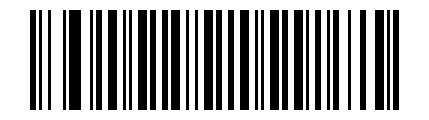
Host#
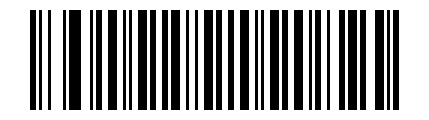
Auto Aim#
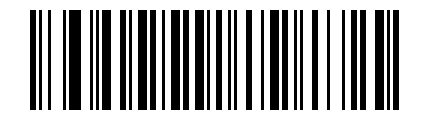
Auto Aim with Illumination#
Continuous code reading and timeout#
Continuous code reading#
Used to control whether the device continues to try to read barcodes after a trigger.
Disable, default valueEnable
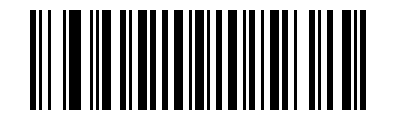
* Disable continuous code reading#

Enable continuous code reading#
Unique barcode reporting#
Used to control the reporting strategy of repeated content during continuous code reading.
Disable, default valueEnable
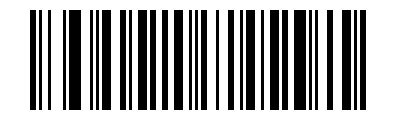
* Disable unique barcode reporting#

Enable unique barcode reporting#
Low light motion detection#
Used to adjust motion detection strategies in low-light environments.
No Low Light Motion Detection, default valueLow Light Motion Detection 1Low Light Motion Detection 2

* Disable low-light motion detection#

Low light motion detection level 1#

Low light motion detection level 2#
Demo mode view#
Used to adjust the target detection field of view in demonstration mode. The default value is Medium Field of View. The corresponding setting code has been extracted. The name of the field of view type shall be subject to the original text for subsequent proofreading.
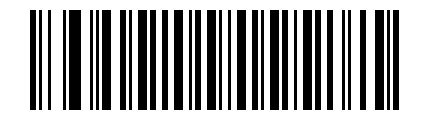
Demo mode field of view option 00h#

Demo mode field of view option 01h#

Demo mode field of view option 02h#
PDF priority timeout#
Used to set the waiting time for the device to first try to read PDF417 before reporting the one-dimensional code in the field of view after PDF Prioritization is enabled.
Value range:
0to5000 msDefault value:
200 msSetting method: first scan the setting code below, then scan the 4-digit barcode and enter the millisecond value
For example, when set to 400 ms, you need to scan the setting code and then enter 0400.

Set PDF priority timeout#
Same code repetition decoding interval#
Used to limit the same barcode from being output repeatedly in a short period of time. According to the default parameter table, the default value is 0.6 seconds. It is currently confirmed that there is an independent setting code, which is suitable for inputting specific interval values in conjunction with numerical barcodes.
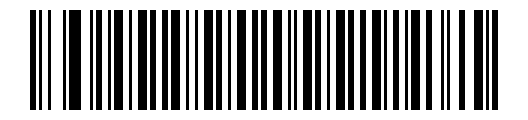
Set the same code repeated decoding interval#
Different code repetition decoding interval#
Used to limit the minimum interval when reading different barcodes continuously. According to the default parameter table, the default value is 0.2 seconds.
Value range:
0.1to9.9secondsInput method: After scanning the setup code below, scan the 2-digit barcode

Set the different code repetition decoding interval#
Low power consumption and stop conditions#
Low power delay#
This parameter is used to set how long the device remains active after decoding is complete. After a scanning session ends, the device waits for a set time before entering low-power mode.
Note
Original description: This parameter only takes effect when Power Mode is set to low power mode.
Low power consumption delay value table#
The following values have been confirmed from the original text:
1 Second5 Seconds1 Minute5 Minutes15 Minutes1 Hour
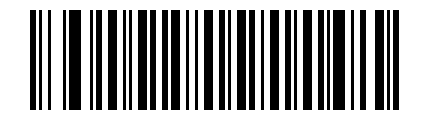
1 second#
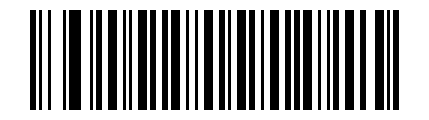
5 seconds#
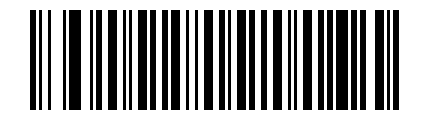
1 minute#
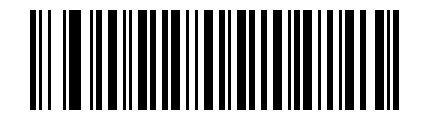
5 minutes#
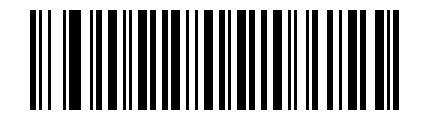
15 minutes#
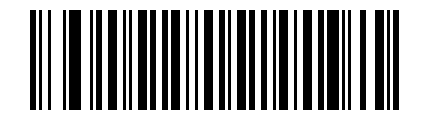
1 hour#
If you need to set it to a value other than the above, the original text requires programming through the “Using Time Delay to Low Power Mode with SSI” method in the SSI interface.
Low power mode switch#
Source page: Page 102 Power Mode (Serial Hosts Only)
Continuous OnDoes not enter low power state after decoding attempt.Low Power ModePress the “low power delay” parameter to enter low power mode after decoding attempt.
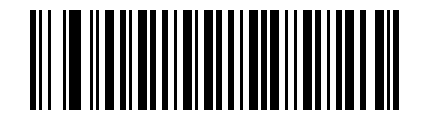
Continuous On#
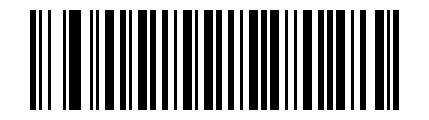
Low Power Mode#
Picklist mode#
Used to limit the device to decoding only bar codes located below the center area of the targeting pattern.
Disabled Always, default valueEnabled Always
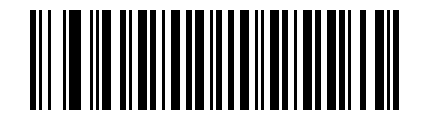
* Always disable Picklist#

Always enable Picklist#
Decoding session timeout#
Used to set the maximum duration of a single decoding attempt, ranging from 0.5 to 9.9 seconds in 0.1 seconds.
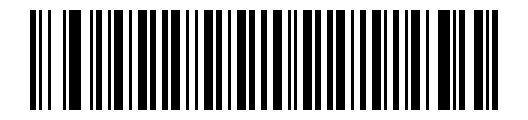
Set decoding session timeout#
Host Serial Response Timeout#
See also
This parameter belongs to the serial port and SSI communication parameters; when using the serial port host mode directly, the complete value and communication instructions should be checked in the complete PL5 module manual.
Host Character Timeout#
See also
This parameter belongs to the serial port and SSI communication parameters; when using the serial port host mode directly, the complete value and communication instructions should be checked in the complete PL5 module manual.